
Modern WordPress websites often support high traffic, complex integrations, multilingual content, ecommerce workflows, and frequent feature releases. To keep these sites reliable, DevOps practices give development teams a structured way to automate deployment, improve performance, reduce risk, and scale infrastructure as demand grows.
TLDR: WordPress DevOps combines automation, version control, testing, monitoring, and scalable hosting practices to keep websites fast and stable. Successful teams separate environments, deploy through controlled pipelines, use caching and CDNs, and monitor performance continuously. Security, backups, and observability are treated as ongoing operational responsibilities rather than one-time setup tasks.
Why DevOps Matters for WordPress
WordPress is often seen as easy to launch, but scalable WordPress operations require more than installing themes and plugins. A growing site may face sudden traffic spikes, plugin conflicts, database bottlenecks, slow media delivery, and inconsistent code changes. DevOps helps reduce these risks by creating repeatable systems for building, testing, releasing, and maintaining the site.
For agencies, publishers, SaaS marketers, universities, and ecommerce brands, DevOps also improves collaboration. Developers, system administrators, QA specialists, and content teams can work from a shared process rather than relying on manual uploads or emergency fixes.
Use Version Control for All Custom Code
A scalable WordPress project should keep all custom work in a version control system such as Git. This includes custom themes, plugins, configuration files, build scripts, and deployment instructions. The database and uploaded media generally should not be stored in the same repository, although database migration scripts and content sync procedures can be documented.
Best practices include:
- Using feature branches for new development.
- Protecting the main branch with review requirements.
- Writing clear commit messages that explain business and technical intent.
- Tagging releases so teams can roll back if necessary.
- Keeping environment-specific secrets out of the repository.
Version control gives teams a reliable history of changes and makes it easier to identify when a bug, performance issue, or compatibility problem was introduced.
Separate Development, Staging, and Production
Strong WordPress DevOps workflows use multiple environments. A development environment supports active coding, a staging environment mirrors production for testing, and production serves visitors. This separation prevents unfinished features or untested plugin updates from affecting real users.
Staging should match production as closely as possible, including PHP version, web server configuration, object cache behavior, database engine, and key plugins. When staging and production differ significantly, testing becomes less reliable and deployment risk increases.
Automate Deployments with CI/CD
Continuous integration and continuous delivery, often called CI/CD, help WordPress teams move away from manual file uploads. A deployment pipeline can install dependencies, run tests, build assets, check coding standards, and deploy approved changes to the correct environment.
A common pipeline may include:
- Code pushed to a Git repository.
- Automated linting and unit tests.
- Theme asset compilation and optimization.
- Security scanning for known vulnerabilities.
- Deployment to staging for review.
- Manual approval before production release.
Automated deployments reduce human error and make releases more predictable. They also make rollback strategies easier because every release is traceable.
Design for Performance and Scalability
Scalable WordPress performance depends on several layers working together. The application code should be efficient, the hosting stack should be tuned, and content should be delivered through optimized infrastructure.
Important performance practices include:
- Page caching: Serving cached HTML reduces PHP and database load.
- Object caching: Redis or Memcached can speed up repeated database queries.
- CDN delivery: A content delivery network distributes images, CSS, JavaScript, and cached pages closer to visitors.
- Database optimization: Indexing, cleanup jobs, and query review prevent slowdowns as content grows.
- Media optimization: Compressed images, modern formats, and lazy loading improve page speed.

Developers should also avoid unnecessary plugin bloat. Every plugin adds code, database queries, assets, or external requests. A scalable site usually depends on a carefully selected plugin stack, with custom development used when business requirements demand tighter control.
Manage Configuration and Secrets Securely
Configuration should be predictable across environments, but sensitive values must be protected. Database passwords, API keys, SMTP credentials, and payment gateway secrets should be stored in environment variables or a secure secret manager rather than hardcoded into theme or plugin files.
WordPress configuration can also be improved by defining constants for caching, debugging, file editing, memory limits, and environment type. This helps DevOps teams enforce consistent behavior while keeping production secure.
Build a Security-First Workflow
Security is essential for scalable WordPress operations. A larger site attracts more traffic, but it may also attract more automated attacks. DevOps teams should treat security as a continuous workflow rather than a checklist completed at launch.
Key security practices include:
- Applying WordPress core, theme, and plugin updates through a tested release process.
- Using least-privilege access for administrators, developers, and editors.
- Enforcing strong authentication and multifactor login for privileged accounts.
- Disabling direct file editing in the WordPress admin area.
- Monitoring logs for suspicious behavior and repeated failed login attempts.
- Using a web application firewall where appropriate.
Security tools are valuable, but process discipline matters just as much. Clear ownership, documented response plans, and patch management schedules help prevent avoidable incidents.
Monitor Everything That Affects Users
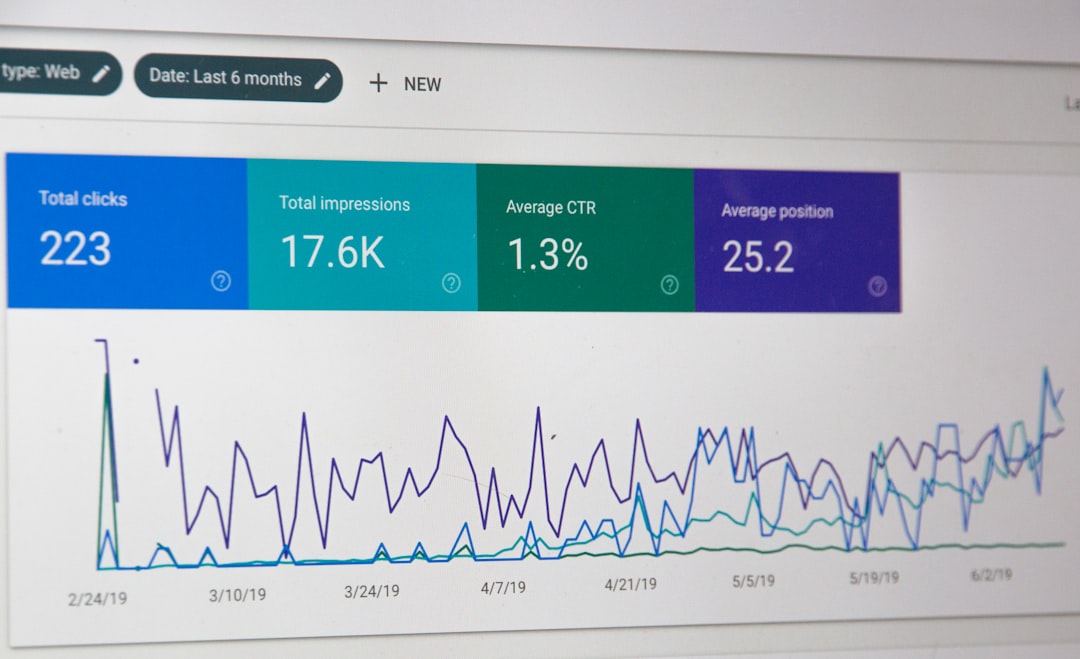
Monitoring gives teams visibility into the real health of a WordPress website. Uptime checks alone are not enough. A site may be technically online while checkout pages fail, search slows down, or admin screens become unusable.
Effective monitoring may include server metrics, PHP errors, slow queries, cache hit rates, response times, 404 errors, form failures, and external API status. Application performance monitoring can help identify whether delays come from WordPress code, plugins, the database, or third-party services.
Alert fatigue should be avoided. Alerts need clear thresholds, owners, and escalation paths. The best monitoring systems help teams act quickly instead of overwhelming them with noise.
Plan Backups and Disaster Recovery
Backups are only useful if they can be restored. Scalable WordPress DevOps requires automated backups for both the database and uploaded media, with retention policies that match the business risk. Backups should be stored outside the main production server so a server failure does not destroy recovery options.
Restoration should be tested periodically. Teams should know how long recovery takes, which data may be lost, and who approves restoration during an incident. For high-value websites, disaster recovery planning may include multi-region storage, standby infrastructure, and documented recovery time objectives.
Use Infrastructure That Can Grow
As traffic increases, infrastructure must support growth without constant redesign. Managed WordPress hosts, container platforms, cloud servers, and Kubernetes-based systems can all work, depending on team skills and business needs. The important point is that infrastructure should be reproducible, documented, and observable.
Infrastructure as Code tools can define servers, networks, storage, and deployment settings in files. This makes environments easier to recreate and reduces undocumented manual changes. For larger WordPress platforms, horizontal scaling may require shared media storage, external object caching, database replication, and load balancing.
Maintain Documentation and Operational Discipline
Documentation is often overlooked, yet it is one of the strongest DevOps tools. A scalable WordPress team should document deployment steps, rollback procedures, plugin approval rules, emergency contacts, access policies, and environment details.
Good documentation reduces dependency on individual developers and helps new team members contribute safely. It also supports audits, client handovers, and incident reviews.
Conclusion
WordPress can scale successfully when DevOps practices are treated as part of the platform, not as an afterthought. Version control, CI/CD, caching, monitoring, secure configuration, backups, and disciplined infrastructure management all contribute to a faster and more resilient website. With these practices in place, WordPress teams can release more confidently and support growth without sacrificing stability.
FAQ
What is WordPress DevOps?
WordPress DevOps is the use of automation, collaboration, testing, deployment pipelines, monitoring, and infrastructure management to build and operate WordPress websites more reliably.
Does every WordPress site need CI/CD?
Small brochure sites may not require a complex pipeline, but any site with frequent changes, custom code, or business-critical traffic benefits from automated testing and controlled deployments.
What is the most important scaling technique for WordPress?
Caching is often the first major improvement. Page caching, object caching, and CDN delivery can significantly reduce server load and improve response times.
How should plugin updates be handled?
Plugin updates should be tested in staging before production release. Critical security updates may require faster handling, but they should still follow a documented approval and rollback process.
Why are backups not enough on their own?
Backups only provide value when restoration is tested and documented. A team must know how to recover data quickly and verify that the restored site works correctly.