
Search engine optimization has evolved from a niche technical skill into an essential discipline for marketers, founders, bloggers, and agencies. Yet despite the growing complexity of SEO, sometimes what you need most is instant access to reliable domain metrics—without logging into multiple dashboards. That’s where SEO browser extensions like MozBar come in. These small but powerful tools sit in your browser and transform every webpage into an opportunity for deeper insight.
TLDR: SEO browser extensions like MozBar provide instant domain and page authority metrics directly in your browser. They help marketers analyze competitors, evaluate backlinks, inspect on-page SEO, and identify ranking opportunities without switching tools. Popular options include MozBar, Ahrefs SEO Toolbar, SEMrush SEO Toolkit, and Ubersuggest. Choosing the right extension depends on your workflow, budget, and the metrics you value most.
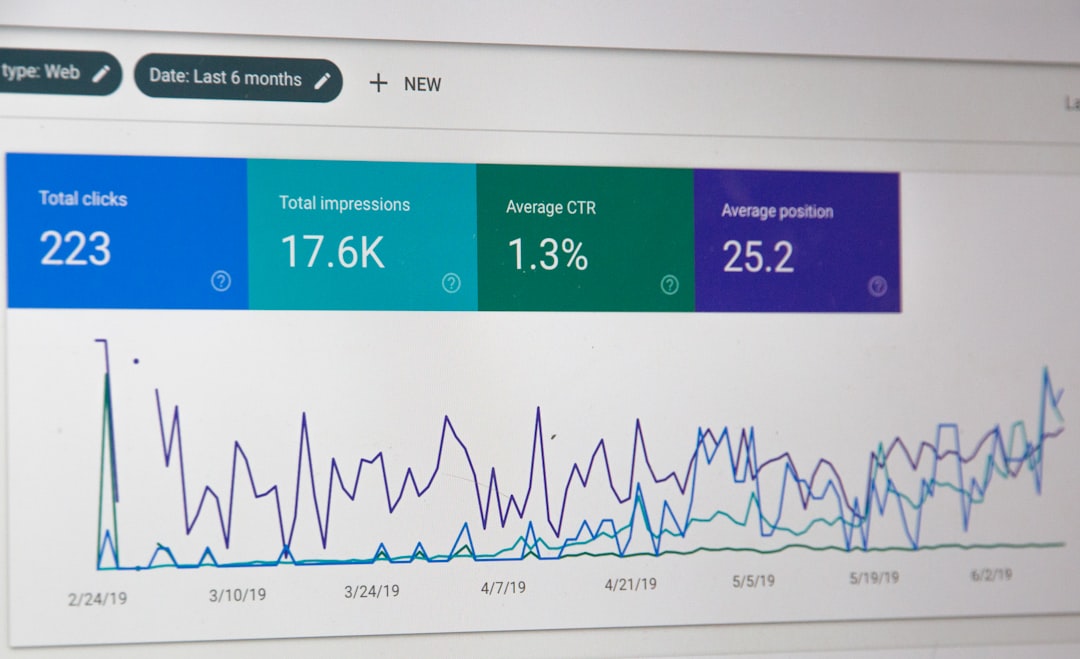
Instead of guessing whether a site is authoritative, spammy, or worth pursuing for outreach, these extensions deliver data in seconds. Whether you’re prospecting for link-building opportunities, analyzing competitors, or auditing your own pages, they streamline your workflow dramatically.
What Are SEO Browser Extensions?
SEO browser extensions are lightweight add-ons for browsers like Chrome and Firefox. Once installed, they overlay valuable SEO data directly onto the websites and search engine results pages (SERPs) you’re viewing.
With a single click, you can access:
- Domain Authority (DA) and Page Authority (PA)
- Backlink counts
- Keyword data
- On-page optimization insights
- Technical SEO elements
- Spam scores
The convenience factor is what makes these tools so compelling. Instead of navigating separate SEO platforms, key metrics are layered directly over the browsing experience.
Why Instant Domain Metrics Matter
In SEO, time and information are everything. When evaluating guest posting opportunities, partnership sites, or potential competitors, you need quick, actionable data.
Instant domain metrics help you:
- Filter low-quality sites quickly
- Prioritize outreach targets
- Size up competitors instantly
- Spot ranking opportunities in SERPs
For example, imagine you’re searching Google for “best project management tools.” An SEO extension can instantly display the authority of every ranking domain—helping you realistically assess whether competing for that keyword is feasible.
Popular SEO Browser Extensions Like MozBar
While MozBar pioneered widespread use of instant authority metrics, several competitors now offer compelling alternatives. Here are some of the most widely used tools:
1. MozBar
MozBar remains one of the most recognizable SEO extensions. It allows users to view:
- Domain Authority (DA)
- Page Authority (PA)
- Spam Score
- Link metrics
- On-page elements
It also highlights nofollow links and lets you export SERP analysis results.
2. Ahrefs SEO Toolbar
Ahrefs offers a robust extension designed for both technical and competitive analysis.
- Domain Rating (DR)
- URL Rating (UR)
- Organic traffic estimates
- Keyword counts
- Redirect trace and HTTP status codes
Its strength lies in combining backlink data with live technical diagnostics.
3. SEMrush SEO Toolkit
This extension integrates with SEMrush accounts to display:
- Authority Score
- Traffic estimates
- Keyword trends
- SERP feature analysis
It’s particularly useful for PPC and keyword research professionals.
4. Ubersuggest Chrome Extension
Designed for accessibility, Ubersuggest focuses on simplicity:
- Domain score
- Traffic estimates
- Backlink overview
- Keyword suggestions in SERPs
It’s a practical choice for freelancers or marketers new to SEO.
Comparison Chart: Top SEO Browser Extensions
| Tool | Authority Metric | Free Version | Backlink Data | Technical SEO Tools | Best For |
|---|---|---|---|---|---|
| MozBar | DA / PA | Yes | Limited in free version | Basic | Quick SERP analysis |
| Ahrefs Toolbar | DR / UR | Limited | Strong | Advanced | Competitive research |
| SEMrush Toolkit | Authority Score | Limited | Strong | Moderate | Keyword and PPC analysis |
| Ubersuggest | Domain Score | Yes | Basic | Minimal | Beginner SEO users |
Key Features That Make These Tools Powerful
1. SERP Overlay Metrics
Perhaps the most transformative feature is real-time data directly within Google results pages. Instead of manually copying URLs into analytics tools, the metrics appear automatically.
This allows you to:
- Assess ranking difficulty
- Find weak competitors
- Spot niche opportunities
2. On-Page SEO Inspection
With one click, you can view:
- Meta titles and descriptions
- Header tags
- Canonical tags
- Robots directives
This is incredibly useful during technical audits or while reverse-engineering competitor pages.
3. Link Highlighting
Many extensions highlight nofollow versus follow links directly on the page. For link builders, this saves substantial time when assessing partnership opportunities.
4. Redirect and Status Code Analysis
Advanced extensions, particularly Ahrefs, allow you to inspect redirect chains, 404 errors, and other HTTP issues. This adds a technical layer typically found only in dedicated crawling tools.
How SEO Professionals Use Browser Extensions
These tools are more than conveniences—they shape workflows.
For Link Builders
- Quickly qualify outreach prospects
- Evaluate backlink quality
- Check spam risk
For Content Marketers
- Analyze top-ranking competitors
- Identify content gaps
- Evaluate keyword competitiveness
For Technical SEOs
- Spot indexing issues
- Audit redirect paths
- Inspect meta implementation
Limitations You Should Know
Despite their power, SEO browser extensions have constraints.
- Data sampling: Free versions often limit metrics.
- Database differences: Authority scores vary between providers.
- Performance impact: Running multiple extensions may slow browsing.
- Surface-level data: Deep analysis still requires full platforms.
It’s important to remember that no single metric defines SEO strength. Domain Authority, Domain Rating, and Authority Score are proprietary formulas—not Google ranking factors.

Best Practices for Using SEO Extensions Effectively
To maximize value and avoid misinterpretation, follow these guidelines:
- Compare multiple metrics before making decisions.
- Use domain scores as directional indicators, not absolutes.
- Combine extension insights with deeper platform audits.
- Avoid installing too many overlapping tools.
Professionals often choose one primary extension aligned with their main SEO platform to maintain consistency in metrics and workflow.
The Future of SEO Browser Extensions
As AI continues to influence digital marketing, we can expect browser extensions to become smarter and more predictive. Instead of simply displaying metrics, future versions may:
- Suggest link-building opportunities in real time
- Flag content gaps automatically
- Identify ranking volatility trends
- Deliver AI-powered optimization recommendations
The goal is clear: reduce friction between insight and action. The less time spent navigating dashboards, the more time can be devoted to strategy and execution.
Final Thoughts
SEO browser extensions like MozBar have fundamentally changed how marketers interact with the web. By embedding domain metrics directly into the browsing experience, they eliminate guesswork and accelerate decision-making.
Whether you’re sizing up competitors, building links, auditing content, or exploring keyword opportunities, these tools offer immediate clarity. While they don’t replace comprehensive SEO platforms, they serve as powerful companions—turning every webpage and search result into a mini SEO dashboard.
In a field where speed and precision matter, that kind of instant intelligence isn’t just convenient—it’s transformative.